Accessibility
Navigation Path :
- Academics
- Academic
- Subject Assignment
Preface :
Assignment is the task given to the object to be completed within a stipulated time.
Scope in the current context :
Subject Assignments form is used in New Assignments.
Description :
This form is used for defining Worksheet Allocation for the Subjects.
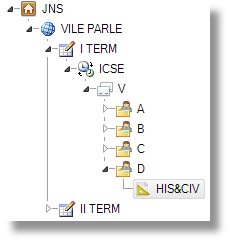
Click On the Subject (i.e., CRAFT, PED etc) of the Tree.
When you click on the tree, the information display on grid regarding that Subject. If there is no Assignment then click on the New Assignment button.
| Assignment Name |
The user has to enter the Name of the Assignment. |
| Start Date |
The user has to enter Start Date of this Assignment. |
| End Date |
The user has to enter the End Date of this Assignment. |
| Attachment |
Select the file for the attachment. |
| Passing Marks |
The user has to enter the Passing marks for this Assignment. |
| Maximum Marks |
The user has to enter the Maximum marks for this Assignment. |
the Students will display in the second grid.

Subject |
When you click on this button Subject-wise tree will be display. |

Exam |
When you click on this button Exam-wise tree will be display. |

Content |
When you click on this button Subject-wise tree will be display. |

New Assignment |
When you click on this button New Assignment Form will be display. |